The LCD Traction Machine is a professional physiotherapy and rehabilitation device designed to provide controlled traction therapy for the cervical and lumbar regions of the spine. With an LCD-based digital control system, the machine allows the therapist to manage important treatment parameters such as traction force and treatment duration according to the patient’s rehabilitation requirements.
The LCD Traction Machine is designed for physiotherapy clinics, rehabilitation centres, hospitals, orthopedic practices, spine-care facilities, and professional healthcare environments. It can be used for both cervical and lumbar traction, making it a versatile addition to a modern physiotherapy setup.
The machine provides a more controlled approach than manually applied traction because the therapist can select and monitor the available treatment parameters through the digital interface. Depending on the selected mode and configuration, traction can be delivered as static or intermittent therapy.
The Digital Cervical & Lumbar Traction Physiotherapy Machine can be incorporated into selected rehabilitation programs for neck, lower-back, and spinal conditions following appropriate patient assessment.
What Is an LCD Traction Machine?
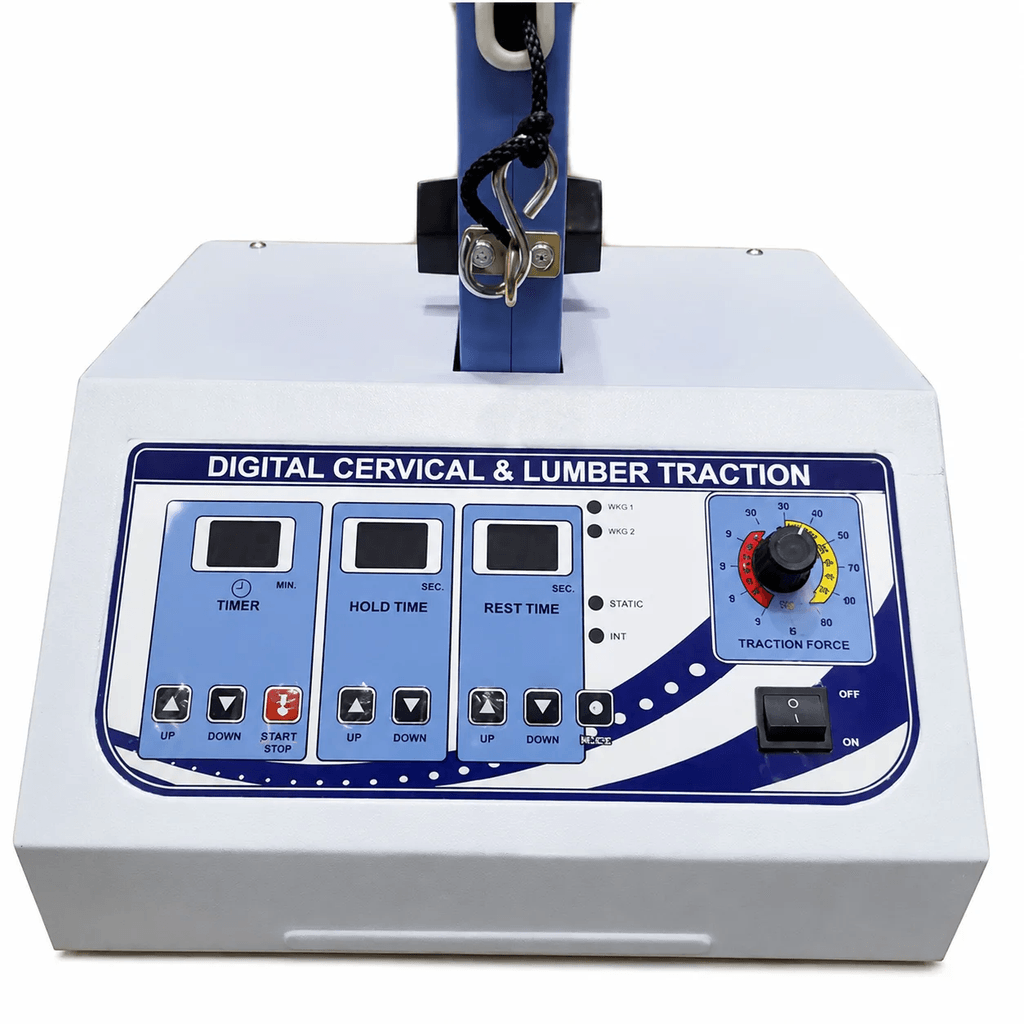
An LCD Traction Machine is a motorized spinal traction system that uses an electronic control interface to apply a measured pulling force to the cervical or lumbar region.
Traction therapy works by applying a controlled longitudinal force to a selected area of the spine. Depending on the treatment technique, patient position, and clinical objective, this mechanical force may be incorporated into rehabilitation programs intended to reduce mechanical loading, support movement, or manage selected musculoskeletal symptoms.
The LCD control system provides the therapist with a convenient way to set and monitor the available treatment parameters.
Typical controls may include:
- Traction force
- Treatment time
- Static traction
- Intermittent traction
- Hold time
- Rest time
- Start and stop controls
- Safety controls
The exact controls and adjustment ranges depend on the particular machine configuration.
The machine should not be used simply because a patient has back or neck pain. A trained physiotherapist or qualified healthcare professional should first determine whether traction is clinically appropriate.
How Does the LCD Traction Machine Work?
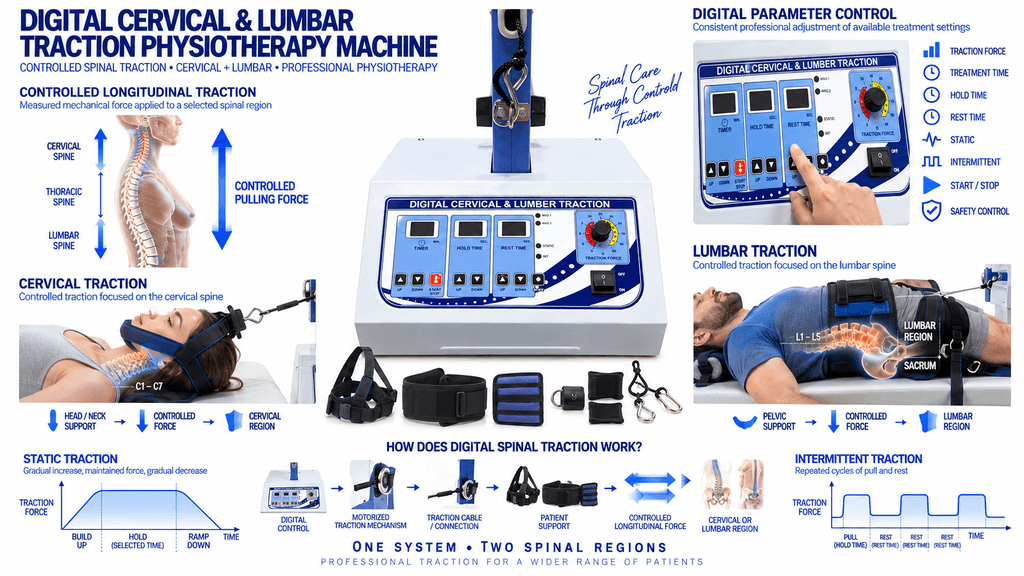
The LCD Traction Machine uses a motorized mechanism to generate a controlled pulling force.
For cervical treatment, the patient’s head and neck are positioned using the appropriate cervical support or halter. The machine then applies traction along the selected direction.
For lumbar treatment, the patient is positioned with suitable pelvic or lumbar support. The traction mechanism applies a controlled force through the appropriate belt or support system.
The therapist selects the treatment parameters according to the clinical protocol.
Controlled Traction Force
The machine allows the operator to select an appropriate traction force within the available operating range. This provides greater control compared with manually estimating the pulling force.
Static Traction
Static traction maintains the selected force for a predetermined period. It provides a continuous traction pattern during the active treatment phase.
Intermittent Traction
Intermittent traction alternates between traction and rest or reduced-force periods. This creates a repeated loading and unloading pattern.
Digital Treatment Timing
The LCD control system allows the therapist to define the treatment duration and, on supported configurations, the hold and rest periods.
Motorized Operation
The motorized system provides controlled mechanical movement and helps deliver the programmed traction pattern consistently.
Cervical Traction
Cervical traction focuses on the neck region of the spine.
During cervical traction, the patient’s head and neck are positioned correctly using the supplied cervical support system. The therapist then selects the appropriate traction force and treatment duration.
Cervical traction may be considered as part of rehabilitation programs involving selected:
- Mechanical neck pain
- Cervical stiffness
- Reduced cervical mobility
- Cervical spondylosis
- Selected cervical disc-related conditions
- Selected nerve-root-related symptoms
The patient’s condition should always be assessed before treatment because traction is not appropriate for every cervical condition.
Lumbar Traction
Lumbar traction focuses on the lower portion of the spine.
The patient is positioned securely with appropriate pelvic or lumbar support before the traction force is applied. Correct positioning is important because the direction and application of the traction force depend on the patient’s body position.
Lumbar traction may be incorporated into rehabilitation programs for selected:
- Mechanical lower-back pain
- Lumbar stiffness
- Lumbar spondylosis
- Selected disc-related conditions
- Sciatica-related rehabilitation
- Selected nerve-root-related symptoms
- Reduced lumbar mobility
The treatment force and duration should be selected individually rather than using identical settings for every patient.
Key Features of LCD Traction Machine
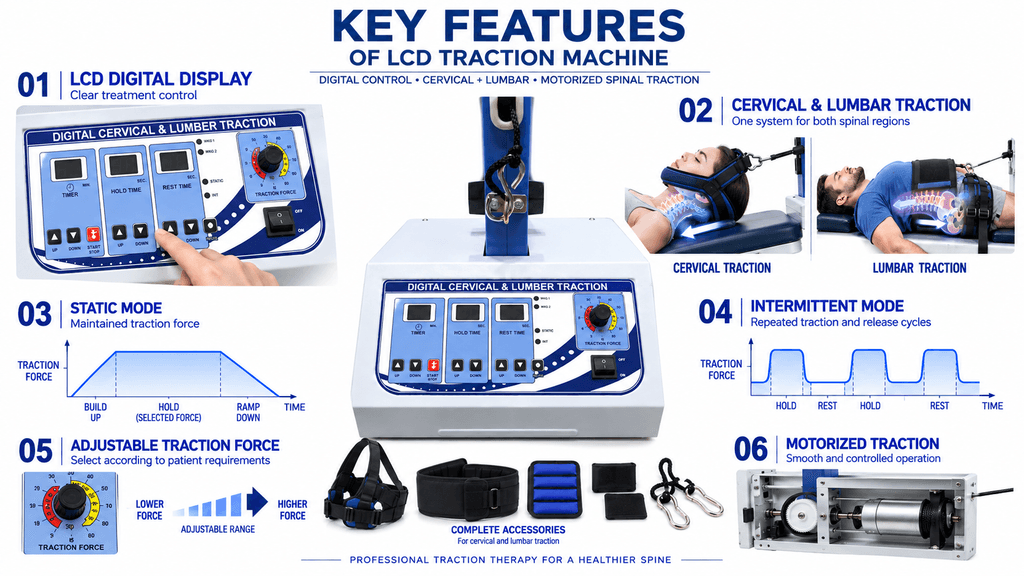
LCD Digital Display
The LCD interface provides a clear control and monitoring system for the available traction parameters. It allows the operator to manage the treatment more conveniently during a clinical session.
Cervical & Lumbar Traction
The machine supports both cervical and lumbar applications, allowing one system to be used for different spinal rehabilitation requirements.
Static & Intermittent Modes
The available traction modes provide flexibility for different treatment protocols. Static traction maintains a selected force, while intermittent traction provides repeated traction and release cycles.
Adjustable Traction Force
The therapist can select the appropriate traction force according to the patient’s treatment requirements and the machine’s available range.
Digital Timer
The treatment timer allows the therapist to set the desired session duration. Supported models may also provide adjustable hold and rest timing.
Motorized Traction
The motorized mechanism provides controlled traction movement and helps maintain the selected treatment parameters throughout the session.
Smooth Force Application
The machine is designed to provide controlled traction rather than sudden manual pulling. Appropriate gradual application can make parameter management easier for the therapist.
Safety Controls
Safety controls allow the treatment to be stopped when required. Depending on the configuration, these may include an emergency-stop mechanism or patient-accessible safety control.
Clinical Patient Support
The machine is designed with support components for positioning the patient during cervical and lumbar treatment.
Professional Construction
The equipment is intended for regular use in professional physiotherapy and rehabilitation environments.
Applications of LCD Traction Machine
The LCD Traction Machine can be incorporated into professionally supervised spinal rehabilitation programs.
Potential applications include:
- Cervical spine rehabilitation
- Lumbar spine rehabilitation
- Neck mobility programs
- Lower-back rehabilitation
- Spinal traction therapy
- Selected disc-related rehabilitation
- Selected nerve-root-related rehabilitation
- Mechanical neck pain management
- Mechanical lower-back pain management
- Postural rehabilitation
- Mobility-focused rehabilitation
- Musculoskeletal rehabilitation
The machine should be considered one component of a complete rehabilitation program rather than a standalone treatment for every spinal problem.
Potential Benefits of LCD Traction Therapy
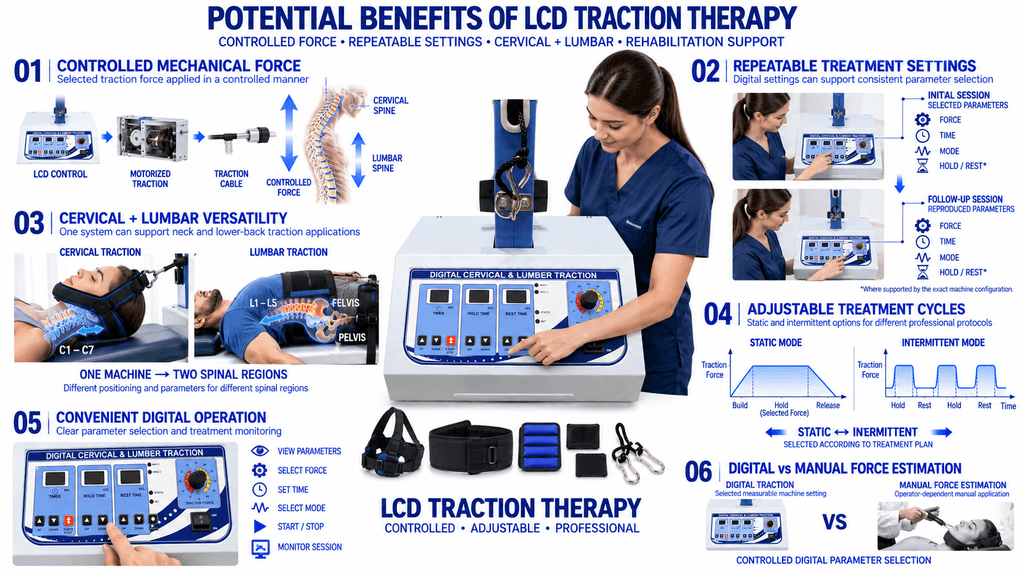
Controlled Mechanical Force
The digital system allows the therapist to apply a selected traction force in a controlled manner.
Repeatable Treatment
Digital settings can make it easier to reproduce treatment parameters during follow-up sessions when clinically appropriate.
Cervical and Lumbar Versatility
One machine can support both neck and lower-back traction, reducing the need for separate traction systems for each region.
Adjustable Treatment Cycles
Static and intermittent options allow the therapist to select different traction patterns according to the treatment plan.
Convenient Digital Operation
The LCD interface makes treatment parameter selection and monitoring easier within a professional clinical environment.
Integration With Physiotherapy
Traction can be incorporated alongside therapeutic exercises, mobility training, strengthening, manual therapy, posture correction, and other rehabilitation techniques when appropriate.
Static vs Intermittent Traction
| Feature | Static Traction | Intermittent Traction |
|---|---|---|
| Force Pattern | Maintained at a selected level | Alternates between traction and rest |
| Main Setting | Force + duration | Force + hold + rest + duration |
| Loading Pattern | Continuous | Cyclic |
| Digital Control | Available | Available on supported systems |
| Treatment Selection | Protocol-dependent | Protocol-dependent |
The choice between static and intermittent traction should be based on patient assessment and the treatment objective.
Digital Cervical & Lumbar Traction Physiotherapy Machine: Clinical Use
The Digital Cervical & Lumbar Traction Physiotherapy Machine is particularly useful for clinics that want one system capable of supporting two major areas of spinal rehabilitation.
For cervical treatment, the machine is configured with the appropriate head and neck support. For lumbar treatment, the appropriate pelvic or lower-back support is used.
This allows the therapist to adapt the equipment to different patient requirements while maintaining digital control over the treatment session.
The therapist can assess the patient’s response and make appropriate changes to force, duration, or traction mode where the machine permits.
This type of controlled setup can be useful when a clinic performs repeated spinal rehabilitation sessions and wants a consistent treatment workflow.
Conditions Commonly Considered for Traction
Traction may be considered as part of rehabilitation for selected conditions, including:
Cervical Spondylosis
Selected patients with cervical degenerative changes may be considered for traction as part of a broader rehabilitation plan.
Lumbar Spondylosis
Lumbar traction may be incorporated into selected rehabilitation programs for patients with lumbar degenerative changes.
Disc-Related Conditions
Certain disc-related conditions may be considered for traction after appropriate clinical assessment.
Sciatica
Patients with symptoms associated with lumbar nerve-root irritation may sometimes be considered for traction depending on the underlying cause and clinical findings.
Mechanical Neck and Back Pain
Traction may be incorporated into selected mechanical pain-management programs where the therapist considers it appropriate.
Reduced Spinal Mobility
Traction can sometimes be included within a broader mobility-focused rehabilitation program.
A diagnosis by itself does not determine whether traction is suitable. Patient history, examination findings, symptoms, neurological status, and contraindications should all be considered.
How to Use the LCD Traction Machine
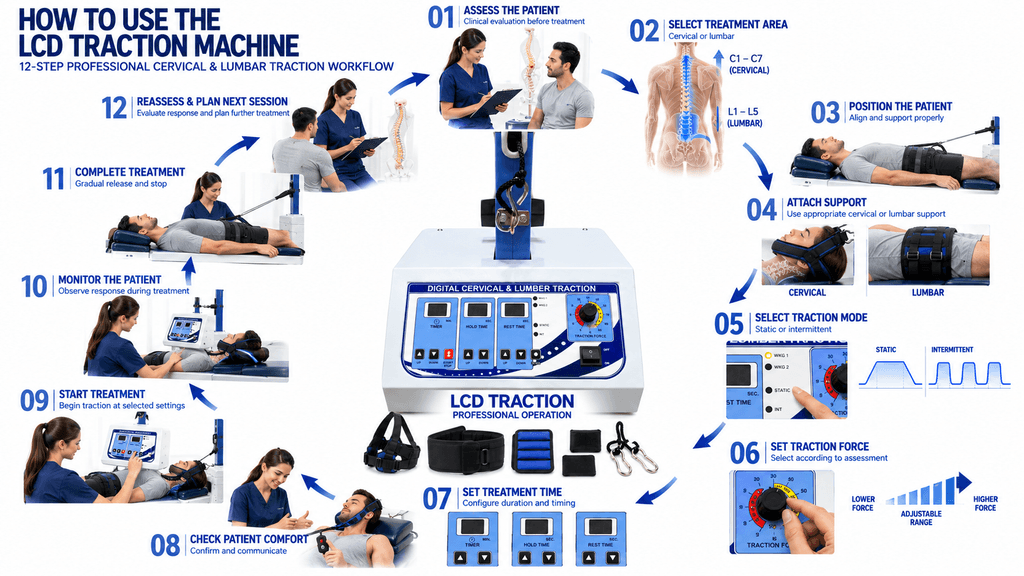
Step 1: Patient Assessment
Assess the patient’s medical history, symptoms, diagnosis, neurological findings where relevant, treatment goals, and possible contraindications.
Step 2: Select the Treatment Area
Choose either cervical or lumbar traction according to the treatment plan.
Step 3: Position the Patient
Place the patient in the appropriate position and ensure that the relevant spinal region is correctly aligned.
Step 4: Attach the Support System
Use the appropriate cervical halter or lumbar/pelvic belt according to the selected treatment.
Step 5: Select the Traction Mode
Choose static or intermittent traction based on the professional treatment protocol.
Step 6: Set the Traction Force
Set the appropriate traction force within the machine’s available range.
Step 7: Set Treatment Duration
Use the LCD control system to select the required treatment time.
For intermittent treatment, configure hold and rest periods where available.
Step 8: Check Patient Comfort
Confirm that the patient is positioned correctly and understands how to communicate discomfort or unexpected symptoms.
Step 9: Start Treatment
Start the machine and allow the traction mechanism to operate according to the selected parameters.
Step 10: Monitor the Patient
The therapist should monitor the patient throughout the session and make appropriate adjustments when required.
Step 11: Complete Treatment
Allow the machine to complete the programmed release cycle before removing the patient support.
Step 12: Clean and Inspect
Clean patient-contact surfaces and inspect the belts, supports, cables, and controls before the next treatment session.
Safety Precautions
The LCD Traction Machine should only be operated by appropriately trained professionals.
Important precautions include:
- Perform proper patient assessment before treatment.
- Follow the manufacturer’s instructions.
- Select force according to the individual treatment plan.
- Confirm correct patient positioning.
- Inspect belts, halters, cables, and supports before use.
- Do not begin with unnecessarily high traction force.
- Monitor the patient throughout the session.
- Ensure the patient can communicate discomfort.
- Use emergency-stop controls when necessary.
- Stop treatment if severe or unexpected symptoms occur.
- Keep electrical components dry.
- Do not use damaged equipment.
- Perform regular maintenance.
- Follow the manufacturer’s servicing schedule.
Traction may not be appropriate for patients with certain fractures, spinal instability, infection, malignancy, severe osteoporosis, certain vascular conditions, or other contraindications. A qualified healthcare professional should determine suitability.
Technical Specifications
| Specification | LCD Traction Machine |
|---|---|
| Product Type | Digital Spinal Traction Machine |
| Display | LCD Digital Display |
| Treatment Areas | Cervical & Lumbar |
| Traction Modes | Static & Intermittent |
| Force Control | Adjustable Digital Traction |
| Timer | Digital Treatment Timer |
| Operation | Motorized |
| Control | Digital Electronic Control |
| Safety | Emergency Stop / Safety Control* |
| Patient Support | Cervical & Lumbar Support |
| Construction | Professional Clinical Construction |
| Application | Physiotherapy & Rehabilitation |
| Usage | Professional Clinical Use |
| Power Supply | AC Power Supply |
*Exact emergency-control design, traction-force range, dimensions, power consumption, accessories, and other specifications should be confirmed against the supplied PHYSIOMODALITIES™ model before final publication.
LCD Traction Machine for Physiotherapy Clinics
The LCD Traction Machine can be an important part of a clinic’s spinal rehabilitation setup because it provides a dedicated system for controlled cervical and lumbar traction.
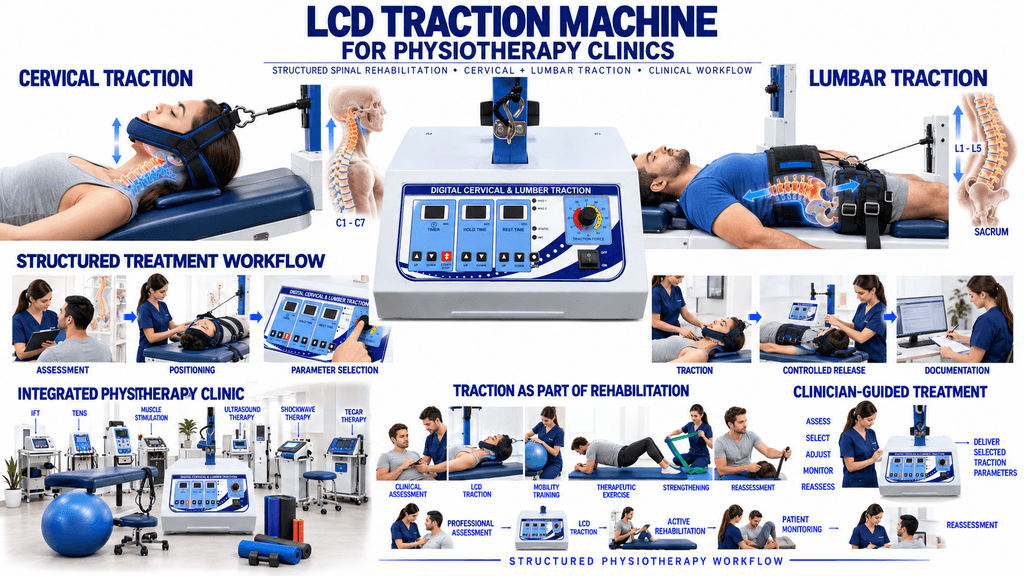
A digital system can help the therapist establish a structured treatment workflow:
Assessment → Positioning → Parameter Selection → Traction → Monitoring → Release → Documentation
This workflow helps keep treatment organized while allowing the therapist to make patient-specific decisions.
The machine can also be used alongside other physiotherapy equipment such as:
- IFT machines
- TENS machines
- Muscle stimulators
- Ultrasonic therapy machines
- Laser therapy systems
- Shockwave therapy machines
- TECAR therapy machines
- Exercise and rehabilitation equipment
Traction should complement, rather than replace, active rehabilitation and professional clinical assessment.
LCD Traction Machine vs Manual Traction
| Feature | LCD Traction Machine | Manual Traction |
|---|---|---|
| Force Application | Motorized | Manually applied |
| Force Setting | Digital / adjustable | Therapist controlled |
| Treatment Timer | Digital | Manual |
| Intermittent Cycles | Programmable on supported models | Manually performed |
| Repeatability | Easier to reproduce | More dependent on therapist |
| Patient Monitoring | Required | Direct therapist control |
| Clinical Setup | Dedicated equipment | Requires continuous manual application |
The advantage of a digital traction system is controlled mechanical operation and parameter management. It does not replace the knowledge and clinical judgment of the physiotherapist.
Who Should Operate the LCD Traction Machine?
The machine should be operated by trained physiotherapists, rehabilitation professionals, or other appropriately qualified healthcare practitioners who understand:
- Spinal anatomy
- Traction principles
- Cervical and lumbar positioning
- Treatment parameters
- Contraindications
- Patient monitoring
- Emergency procedures
Patients should not independently select traction force or treatment duration without professional guidance.
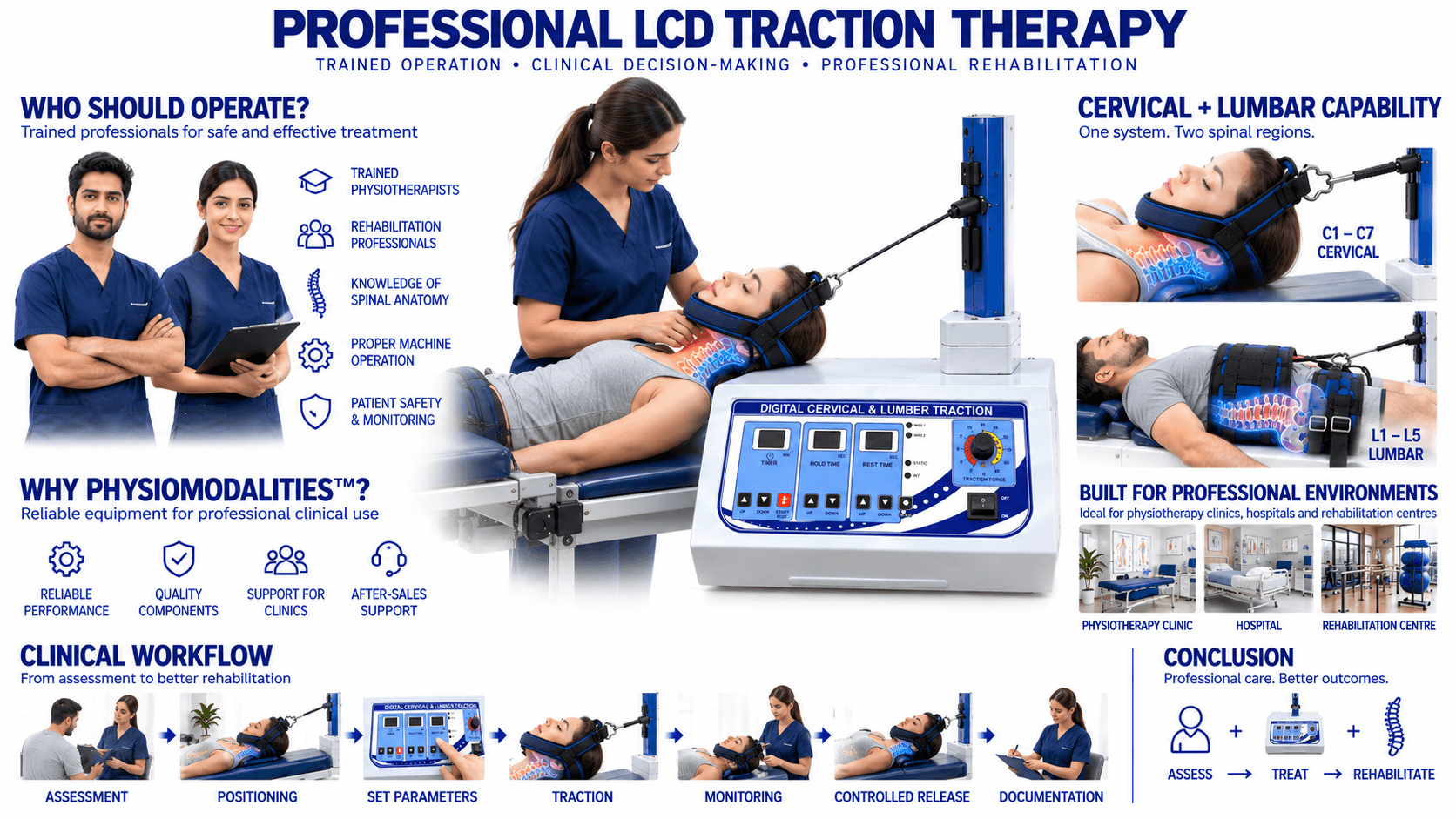
Why Choose PHYSIOMODALITIES™?
PHYSIOMODALITIES™ provides physiotherapy and rehabilitation equipment designed for professional clinical environments.
The LCD Traction Machine is suitable for clinics looking for a digital system that can support both cervical and lumbar traction within a professional rehabilitation setup.
PHYSIOMODALITIES ENTERPRISES supplies physiotherapy equipment for clinics, hospitals, rehabilitation centres, orthopedic facilities, and professional healthcare environments.
Its broader equipment range includes electrotherapy, Ultrasonic therapy, laser therapy, shockwave therapy, TECAR therapy, robotic spine systems, traction equipment, and rehabilitation products.
Conclusion
The LCD Traction Machine is a professional digital traction system designed to provide controlled cervical and lumbar traction for physiotherapy and rehabilitation applications.
Its LCD control interface, adjustable traction parameters, motorized operation, treatment timer, and static/intermittent traction capabilities provide therapists with a structured way to manage spinal traction sessions.
The Digital Cervical & Lumbar Traction Physiotherapy Machine can be incorporated into rehabilitation programs involving selected cervical, lumbar, disc-related, mobility, and musculoskeletal conditions. However, traction is not appropriate for every patient, and treatment should always begin with proper clinical assessment.
For a physiotherapy clinic, the combination of cervical and lumbar traction in one digitally controlled machine provides flexibility for different spinal rehabilitation requirements while allowing the therapist to maintain control over the treatment process.
Frequently Asked Questions
1. What is an LCD Traction Machine?
An LCD Traction Machine is a motorized physiotherapy device with digital controls designed to provide controlled cervical and lumbar spinal traction.
2. Can an LCD Traction Machine provide both cervical and lumbar traction?
Yes. The machine is designed for both cervical and lumbar traction using the appropriate support and treatment setup.
3. What is the difference between static and intermittent traction?
Static traction maintains a selected force for a specific duration, while intermittent traction alternates between traction and rest or reduced-force periods.
4. Is an LCD Traction Machine suitable for every patient with back or neck pain?
No. Traction suitability depends on the patient’s diagnosis, symptoms, examination findings, contraindications, and treatment objectives.
5. Who should operate an LCD Traction Machine?
It should be operated by a trained physiotherapist or another appropriately qualified healthcare professional familiar with spinal traction therapy.